oraimo Laptop Cooling Pads & Phone Coolers in the UAE
Hot rooms, long gaming sessions and laptops used on sofas all push temperatures up. oraimo's cooling range includes the ChillDock laptop pad and two clip-on CoolSnap phone coolers, sold with a 1-year oraimo warranty from our Dubai store.
1 models
Wholesale oraimo laptop cooling pads
Distributor pricing for retailers, online sellers and exporters. Send your model list on WhatsApp and our sales desk replies with a quotation.
Laptop pad or phone cooler: which do you need?
A laptop cooling pad sits under the laptop and pushes air towards its base, while lifting it to a better typing angle. A phone cooler clips or sticks magnetically to the back of your phone and chills the area behind the processor during gaming, streaming or navigation.
What to look for
- Fan setup and airflow. More fans and adjustable speed let you balance cooling and noise.
- Power source. USB-powered pads run from the laptop itself; phone coolers need a Type-C power source.
- Fit and mounting. Check the pad size against your laptop, and whether a phone cooler offers both magnetic and clip mounting.
- Extras. Lighting, phone holders and spare USB ports are nice to have on a gaming desk.
The oraimo cooling range
ChillDock (OSH-009A)
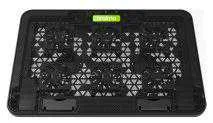
ChillDock is a 360x253x26mm laptop pad with 6 fans, each spinning up to 4000 RPM. Airflow is infinitely adjustable, it runs from 5V 1.5A USB power (7.5W rated), and it adds an extra USB port so you don't lose one on your laptop. It also has a phone holder and 9 lighting modes.
CoolSnap (OG-PC210N)
CoolSnap is a 73.3g phone cooler with AI temperature control, 100 fan-speed levels and 16 RGB lights. It mounts with a magnetic patch or the included clip and runs on Type-C power (5V 3A max). oraimo quotes a temperature reduction of over 32°C.
CoolSnap Lite (OG-PC200N)
CoolSnap Lite keeps the same cooling claim, magnetic grip and clip in a lighter 49g body with RGB lighting, without the AI speed control.
Cooling tips for the UAE
- Use your laptop on a hard, flat surface; beds and cushions block the vents.
- Power CoolSnap from a power bank for long mobile gaming sessions away from a socket.
- In humid weather, moisture can collect on any very cold surface, so wipe your phone dry after long sessions.
- Pair the pad with a wireless keyboard and mouse for a comfortable desk setup.
Frequently asked questions
Does the ChillDock need its own charger?
Will CoolSnap fit my phone?
What is the difference between CoolSnap and CoolSnap Lite?
What powers the CoolSnap phone cooler?
Other categories